之前的文章聊过把 Copilot CLI 嵌入已有流水线——相当于多了一个超级 Agent。今天聊聊它的进阶版。
Ignite 2026(11 月 17 日)把这个进化推进到了架构层:支撑 Copilot 全家(CLI、IDE、GitHub 各端)的那个 agent loop,被微软按三种方式开放了。它的前身 GitHub Copilot SDK 今年 6 月就已 GA,当时已能嵌进应用;Ignite 宣布的 2.0 是把这套能力重构成可共享、可恢复、可按需沙箱化的生产运行时。
一个 Loop,三种拿法
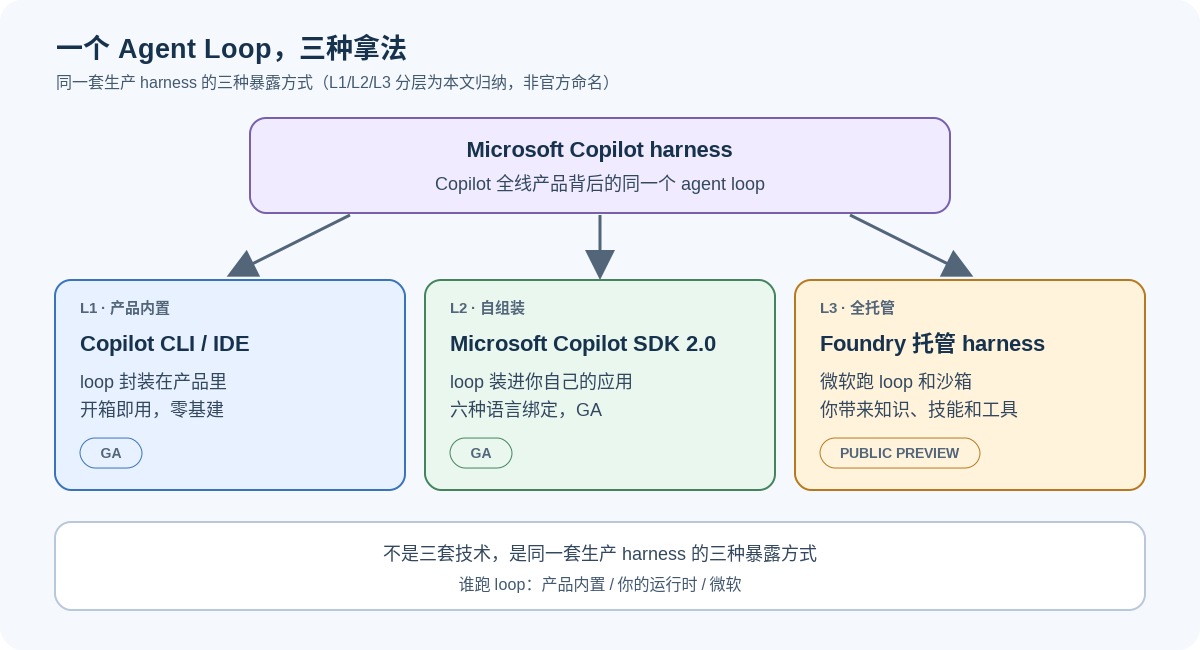
L1 · 产品内置:Copilot CLI 和 IDE 里的 loop,封装在产品内,开箱即用、零基建——这就是你今天已经在用的方式。
L2 · 自组装:Microsoft Copilot SDK 2.0——把 loop 连同运行时做成 SDK,装进你自己的应用,由你的代码来跑。官方定义是「对 Microsoft Copilot harness 的直接编程入口(direct, programmatic access)」,TypeScript、Python、Go、.NET、Java、Rust 六种语言绑定,已 GA。它的前身是 6 月 GA 的 GitHub Copilot SDK,随 10 月 28 日 Microsoft Copilot harness 的发布更名(迁移分阶段进行);2.0 相对前身的增量,是 Rust 核心、单进程多会话与六种部署架构。
L3 · 全托管:Foundry 上的托管 Copilot harness(public preview)。loop 和沙箱都交给微软跑——官方原话说得很直白:「Microsoft runs the agent loop and sandbox」。你带来知识、技能和工具,在 Foundry UI、GitHub Copilot app、Foundry CLI(azd ai)或 Foundry Toolkit for VS Code 里编排,agent 定义进源码管理。preview 的边界也要说清:无 SLA、不建议生产使用;初始版本只能在新建 prompt agent 时选择 harness,受区域与模型限制,且暂不支持 BYOM。
三层不是三套技术,而是同一个问题的三个答案:这个 loop 由谁来跑——产品、你的代码,还是微软。
会话不再是容器
SDK 2.0 用 Rust 重写了核心,官方给了三组数字(同一暖机负载):
| 指标 | TypeScript CLI | Rust core(in-process) |
|---|---|---|
| 暖机单轮总耗时* | 5.25 秒 | 55.3 毫秒 |
| 10 个客户端内存 | 1,383 MB | 126 MB |
| 吞吐 | 7.55 会话/秒 | 120 会话/秒 |
*暖机单轮总耗时 = 创建 client + session 并完成 1 turn,同一暖机负载(官方口径)。
快不是重点。重点是这些数字背后的一次身份反转:会话(session)不再是容器。
旧架构里每个会话住一个容器——首轮要等基础设施启动、成本随会话数线性涨、会话身份就是跑它的那个进程。新运行时是单进程多会话:每个会话有自己的状态、凭据、工具、文件和历史,互相不可见。会话变成廉价、可抛弃的对象。
SDK 长什么样
官方最小示例(TypeScript),三个卖点都在里面:
import { CopilotClient, defineTool } from "@microsoft/copilot-sdk";

const client = new CopilotClient({ mode: "empty" }); // 无宿主默认 shell / 文件访问、无 CLI 默认能力

const lookupOrder = defineTool("lookup_order", {
  description: "查询当前客户的订单",
  parameters: { /* JSON Schema */ },
  handler: async ({ orderId }) => orders.getForCustomer(user.id, orderId),
});

const session = await client.createSession({
  sessionId: `user-${user.id}-orders`, // ③
  github: { token: user.githubToken }, // ①
  tools: {
    definitions: [lookupOrder],
    availableTools: ["custom:lookup_order"], // ②
  },
});
代码按 stable v2.0.2(2026-11-24)多租户文档的写法;与 Ignite 发布文示例的字段名略有差异,以所装版本 API 为准。
① 会话以「用户」的身份运行,而不是你的服务器。 模型调用和工具调用都归属到请求它的用户头上。对治理敏感的场景,这是地基——我在 Agent Governance 系列里反复强调的「agent 行为可归因」,SDK 在运行时层面直接给了。但归因不等于自动完成业务授权:自定义工具的 handler 仍由你的应用实施授权。
② 工具由宿主定义、按会话白名单注册。 mode: "empty" 出发的会话默认什么都摸不到,你给它什么它才有什么。最小权限不是事后配置,是构造方式。
③ 会话是持久的。 代码里那个不起眼的 sessionId 就是恢复的钥匙:运行时把消息、工具调用、计划、检查点追加进一份 session journal,状态可以放进你自己的存储(sessionFs)。任何能读到同一份 journal 的服务实例都可按 sessionId 恢复整个会话——前提是你的应用先验证调用者对该会话的所有权(sessionId 不是授权凭证)——Web 前端断开,长任务继续跑;几小时后一条 webhook 把会话捡起来;官方文档甚至写了让队友把 GitHub Copilot CLI 接上同一个会话来接管或旁观。CLI 系列的读者应该会心一笑:这就是 Copilot 的会话连续性,现在你的应用能拿到同款机制。
在哪里思考,在哪里动手
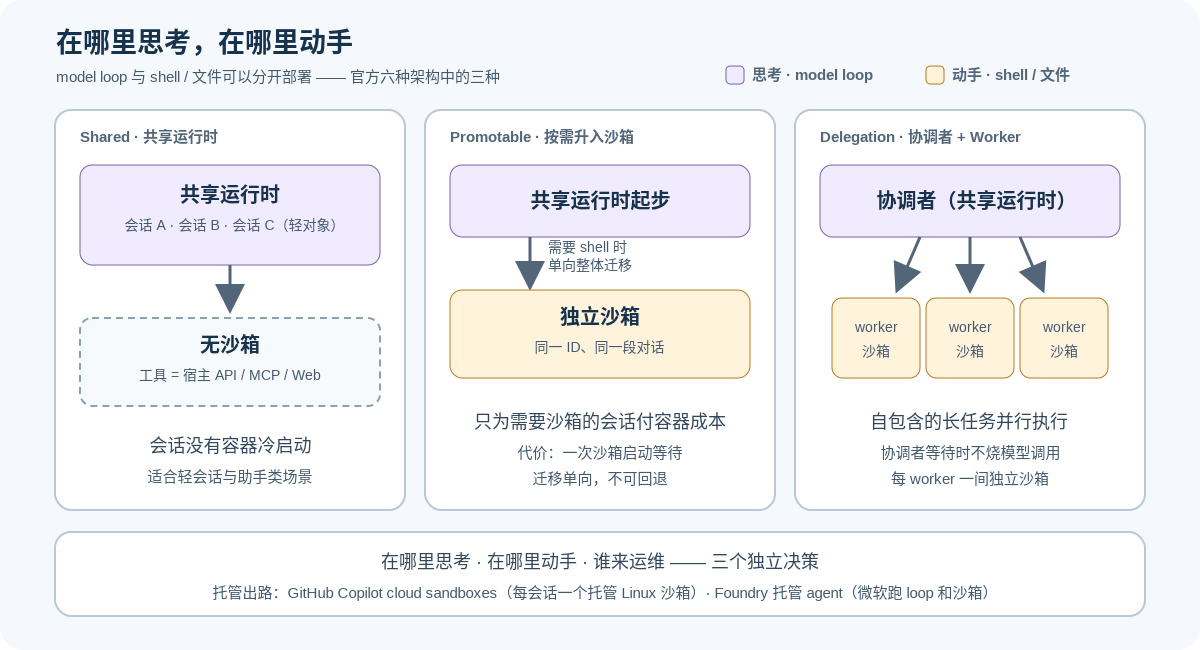 图为自绘,内容依据官方文档整理;Fleet/CLI 的对应关系为笔者类比(推断)
SDK 2.0 最有价值的设计决定,是把两件事拆开了:model loop 在哪里思考,和 shell/文件在哪里动手,可以分开部署。官方文档列了六种架构,挑三种最值得消化:
Shared:全部会话住一个共享进程,没有沙箱,工具是宿主 API。会话是轻对象,没有容器冷启动。
Promotable:会话从共享运行时起步,一旦真需要 shell,整体升入沙箱——同一个 ID、同一段对话、同一个 session 对象。迁移是单向的,代价是一次沙箱启动等待;换来的是只为需要沙箱的会话、在需要的那一刻付容器成本。
Delegation:协调者驻守共享运行时,通过一个工具派出 worker,每个 worker 一间独立沙箱做自包含的长任务。协调者等待时不烧模型调用。
对号入座:Fleet 可类比为 Delegation 形态,CLI 的日常近似 Shared 加按需沙箱(笔者类比,推断)。微软把自己产品的架构模式做成了 SDK 里的选项——你用 Fleet 时体验到的行为,现在可以在自己的应用里复刻。
不想自己运维的话,官方给了两条托管出路:GitHub Copilot cloud sandboxes(每个会话一个 GitHub 托管的隔离 Linux 环境)和 Foundry 托管 agent(就是 L3 的那个托管 harness)。在哪里思考、在哪里动手、谁来运维,现在是三个独立决策。
三层怎么选
| L1 CLI / IDE | L2 SDK 2.0 | L3 Foundry 托管 harness | |
|---|---|---|---|
| 谁跑 loop | 产品内置 | 你的运行时(默认 in-process,亦可子进程/独立服务) | 微软 |
| 状态与恢复 | 产品内闭环 | 默认宿主磁盘;可选 sessionFs 自管并跨实例恢复 | 平台托管 |
| 工具与权限 | 产品能力 | 宿主白名单,最小权限构造 | Toolbox / MCP 连接 |
| 适合 | 个人开发,零基建 | 把 agent 嵌进自己的产品 | 需要平台托管、当前处于试点/评估的企业场景 |
| 状态 | GA | GA | Public Preview |
我的判断:L2 是给「想把 agent 做成产品能力」的团队的,L3 是给「想让平台替自己扛治理」的企业的。对个人开发者,L1 依旧够用——但值得花一小时读 SDK 文档,因为它会让你重新理解你每天在用的那个 CLI。
写在最后
Ignite 的表面新闻是一连串产品公告。往下挖一层,是 Microsoft Foundry 和 GitHub Copilot 正在收敛到同一个技术底座——Foundry 的托管 harness 跑的就是 Copilot 的心脏,SDK 让你把这颗心脏装进自己的应用。
一个 loop,三种拿法:产品内置、自组装、全托管。微软把选择题出给了所有人。
You can outsource your thinking, but you cannot outsource your understanding.
官方参考
- Building modern agentic applications with Microsoft Copilot SDK 2.0(性能数字、六种架构、语言清单、代码示例)
- Introducing the Microsoft Copilot harness(harness 与更名发布公告)
- What’s new in Foundry Agent Service at Ignite 2026(托管 harness preview 原文)
- Use the Microsoft Copilot harness with prompt agents(preview 边界、区域与 BYOM 限制)
- About cloud sandboxes for GitHub Copilot(cloud sandboxes 细节)
- Copilot SDK is now generally available(前身 2026-06-02 GA)
- microsoft/copilot-sdk 仓库(更名 README 与 stable 文档)
- Microsoft Ignite 2026 Book of News
A previous post covered embedding Copilot CLI into an existing pipeline — effectively adding a super agent to it. This time, the next level.
Ignite 2026 (November 17) pushed that evolution into the architecture layer: the agent loop that backs the entire Copilot family — CLI, IDE, the GitHub surfaces — is now open from Microsoft in three ways. Its predecessor, the GitHub Copilot SDK, went GA back in June and could already be embedded into applications; the 2.0 announced at Ignite reworks that capability into a production runtime that is shareable, resumable, and sandboxed on demand.
One Loop, Three Ways to Get It
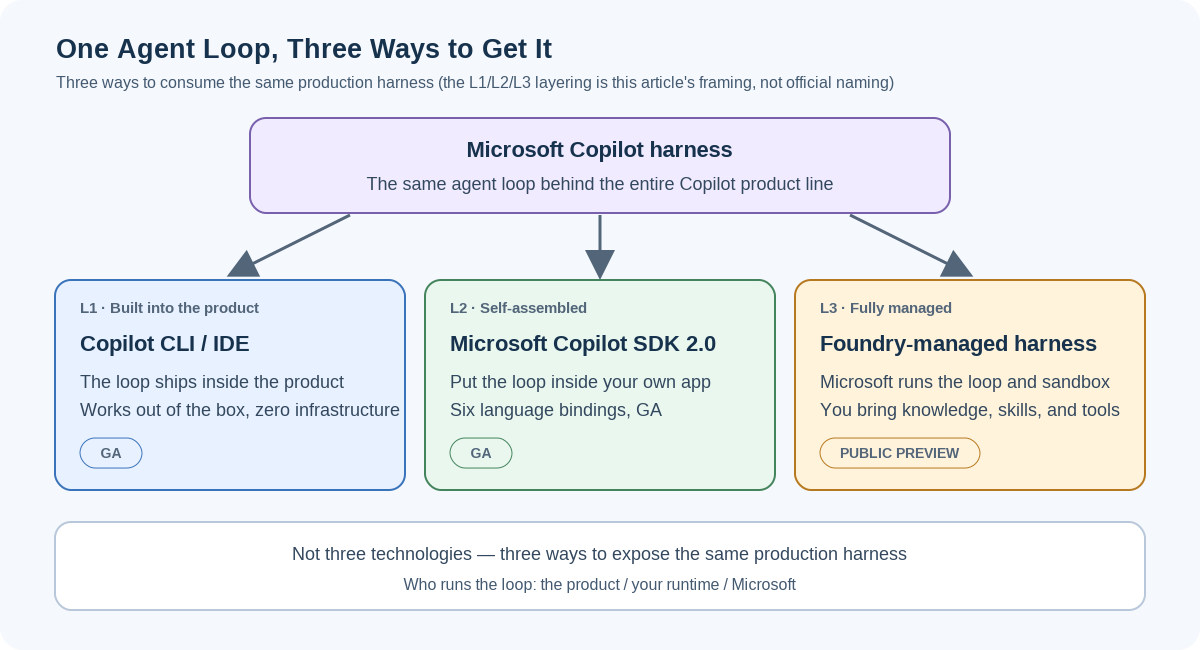
L1 · Built into the product: the loop inside Copilot CLI and the IDE, wrapped in the product, ready out of the box with zero infrastructure — this is what you’re already using today.
L2 · Self-assembled: Microsoft Copilot SDK 2.0 — the loop and its runtime packaged as an SDK you embed in your own app, driven by your code. The official definition is “direct, programmatic access to the Microsoft Copilot harness”; there are GA bindings for six languages (TypeScript, Python, Go, .NET, Java, and Rust). Its predecessor was the GitHub Copilot SDK that went GA in June, renamed alongside the October 28 announcement of the Microsoft Copilot harness (migration rolling out in phases); over that predecessor, 2.0 adds the Rust core, multi-session single process, and six deployment architectures.
L3 · Fully managed: a managed Copilot harness on Foundry (public preview). The loop and the sandbox are handed to Microsoft — the official wording is blunt: “Microsoft runs the agent loop and sandbox”. You bring the knowledge, skills, and tools, orchestrate in the Foundry UI, the GitHub Copilot app, the Foundry CLI (azd ai), or the Foundry Toolkit for VS Code, and the agent definition goes into source control. The preview’s limits deserve equal billing: no SLA, not recommended for production; the initial version only lets you pick the harness when creating a new prompt agent, with region and model restrictions, and no BYOM support yet.
The three layers are not three technologies — they are three answers to one question: who runs this loop — the product, your code, or Microsoft?
The Session Is No Longer a Container
SDK 2.0 rewrote its core in Rust, and the official numbers (same warmed-up workload) are:
| Metric | TypeScript CLI | Rust core (in-process) |
|---|---|---|
| Warm single-turn total time* | 5.25 s | 55.3 ms |
| Memory, 10 clients | 1,383 MB | 126 MB |
| Throughput | 7.55 sessions/s | 120 sessions/s |
*Warm single-turn total time = create client + session and complete 1 turn, same warmed-up workload (official figures).
Speed isn’t the point. The point is the identity reversal behind these numbers: the session is no longer a container.
In the old architecture every session lived in its own container — the first turn waited for infrastructure to start, cost grew linearly with session count, and a session’s identity was the process running it. The new runtime is multi-session in a single process: each session has its own state, credentials, tools, files, and history, invisible to the others. Sessions become cheap, disposable objects.
What the SDK Looks Like
The official minimal example (TypeScript), with all three selling points in one place:
import { CopilotClient, defineTool } from "@microsoft/copilot-sdk";

const client = new CopilotClient({ mode: "empty" }); // no host-default shell/file access, no CLI default capabilities

const lookupOrder = defineTool("lookup_order", {
  description: "Look up the current customer's order",
  parameters: { /* JSON Schema */ },
  handler: async ({ orderId }) => orders.getForCustomer(user.id, orderId),
});

const session = await client.createSession({
  sessionId: `user-${user.id}-orders`, // ③
  github: { token: user.githubToken }, // ①
  tools: {
    definitions: [lookupOrder],
    availableTools: ["custom:lookup_order"], // ②
  },
});
Code follows the stable v2.0.2 (2026-11-24) multi-tenant docs; field names differ slightly from the Ignite announcement sample — trust the API of the version you install.
① Sessions run as the user, not as your server. Model calls and tool calls are attributed to the user who requested them. For governance-sensitive scenarios this is the foundation — the “agent behavior is attributable” property I kept stressing in my Agent Governance series is provided by the SDK at the runtime layer. But attribution is not the same as business authorization: your app still enforces authorization inside custom tool handlers.
② Tools are defined by the host and registered per session on a whitelist. A session that starts from mode: "empty" can touch nothing by default; it has exactly what you hand it. Least privilege isn’t something you configure afterward — it’s how the thing is constructed.
③ Sessions are durable. That unassuming sessionId in the code is the restore key: the runtime appends messages, tool calls, plans, and checkpoints to a session journal, and the state can live in your own storage (sessionFs). Any service instance that can read the same journal can restore the whole session by sessionId — provided your app first verifies the caller’s ownership of that session (a sessionId is not an authorization credential). A web frontend disconnects and the long task keeps running; hours later a webhook picks the session back up; the docs even describe letting a teammate attach the GitHub Copilot CLI to the same session to take over or observe. Readers of the CLI series will recognize this: it’s Copilot’s session continuity, and now your app can get the same machinery.
Where It Thinks, Where It Acts
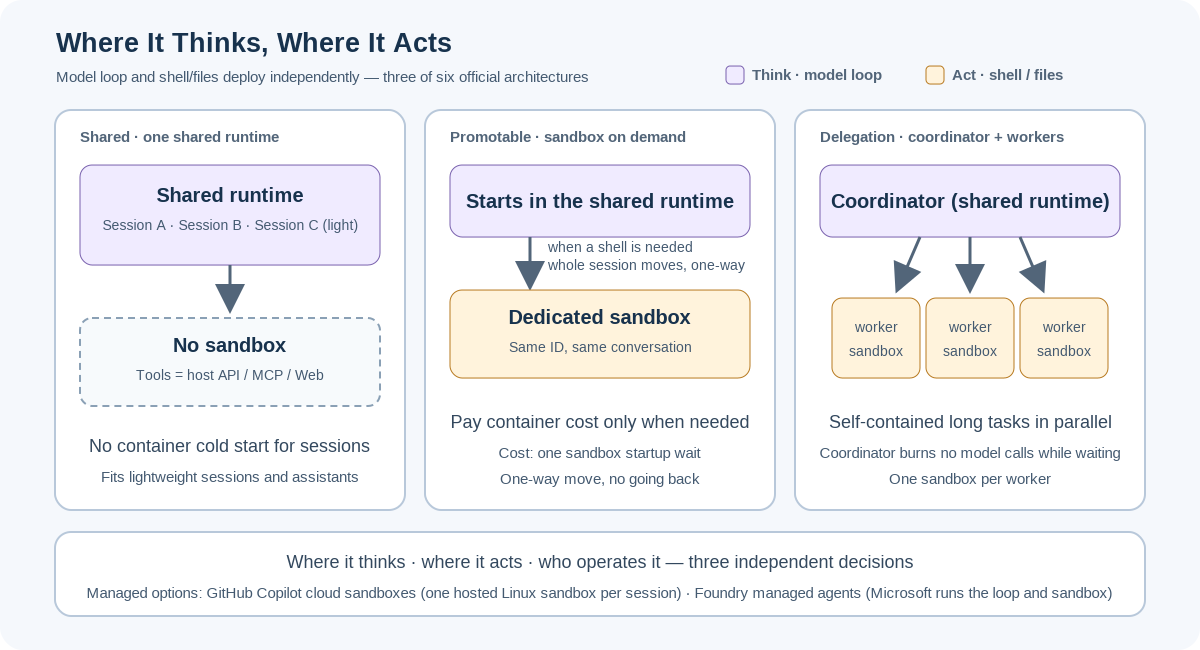 Diagram drawn by me, organized from the official docs; the Fleet/CLI mapping is my own analogy (inferred)
The most valuable design decision in SDK 2.0 is that it separates two things: where the model loop thinks and where the shell/files act can be deployed independently. The docs list six architectures; three are worth digesting:
Shared: all sessions live in one shared process, no sandbox, tools are host APIs. Sessions are lightweight objects with no container cold start.
Promotable: a session starts in the shared runtime, and the moment it genuinely needs a shell it is promoted, whole, into a sandbox — same ID, same conversation, same session object. The move is one-way and costs one sandbox startup wait; in exchange, you pay container cost only for the sessions that need a sandbox, only at the moment they do.
Delegation: a coordinator stays in the shared runtime and dispatches workers through a tool, each worker in its own sandbox running self-contained long tasks. While it waits, the coordinator burns no model calls.
Mapping them onto the products: Fleet is analogous to the Delegation shape; day-to-day CLI use approximates Shared plus on-demand sandboxing (my analogy, inferred). Microsoft turned its own products’ architecture patterns into options in the SDK — the behavior you experience in Fleet can now be replicated in your own app.
If you’d rather not operate this yourself, there are two managed paths: GitHub Copilot cloud sandboxes (one isolated, GitHub-hosted Linux environment per session) and Foundry managed agents (that’s the L3 managed harness). Where it thinks, where it acts, and who operates it are now three independent decisions.
Choosing Between the Three Layers
| L1 CLI / IDE | L2 SDK 2.0 | L3 Foundry-managed harness | |
|---|---|---|---|
| Who runs the loop | Built into the product | Your runtime (in-process by default; subprocess or standalone service also possible) | Microsoft |
| State & recovery | Closed inside the product | Host disk by default; optional self-managed sessionFs with cross-instance restore | Managed by the platform |
| Tools & permissions | Product capabilities | Host whitelist, least privilege by construction | Toolbox / MCP connections |
| Best for | Individual development, zero infra | Teams embedding agents into their own products | Enterprises that want platform-managed governance; currently pilot/evaluation |
| Status | GA | GA | Public Preview |
My read: L2 is for teams that want to turn agents into a product capability; L3 is for enterprises that want the platform to carry governance for them. For individual developers, L1 still suffices — but it’s worth spending an hour with the SDK docs, because they will change how you understand the CLI you use every day.
Closing Thoughts
The surface news from Ignite is a string of product announcements. One layer down, Microsoft Foundry and GitHub Copilot are converging on the same technical foundation — Foundry’s managed harness runs Copilot’s heart, and the SDK lets you put that heart into your own app.
One loop, three ways to get it: built in, self-assembled, fully managed. Microsoft has set the multiple-choice question for everyone.
You can outsource your thinking, but you cannot outsource your understanding.
Official References
- Building modern agentic applications with Microsoft Copilot SDK 2.0 (performance numbers, six architectures, language list, code samples)
- Introducing the Microsoft Copilot harness (harness and rename announcement)
- What’s new in Foundry Agent Service at Ignite 2026 (the managed-harness preview announcement)
- Use the Microsoft Copilot harness with prompt agents (preview boundaries, region and BYOM limits)
- About cloud sandboxes for GitHub Copilot (cloud sandbox details)
- Copilot SDK is now generally available (predecessor GA on 2026-06-02)
- microsoft/copilot-sdk repo (rename README and stable docs)
- Microsoft Ignite 2026 Book of News
Previous in the series: GitHub Copilot CLI: When an AI Agent Joins the Pipeline